Build Your Studio. Create Without Limits.
- Feature
Canal Toys Studio Creator 2 Review: Ring Light, Tripod and Green Screen Kit Explained
The Studio Creator 2 bundles a ring light, tripod, phone holder and green screen. Here is what the listing promises, what reviewers report and who it suits.
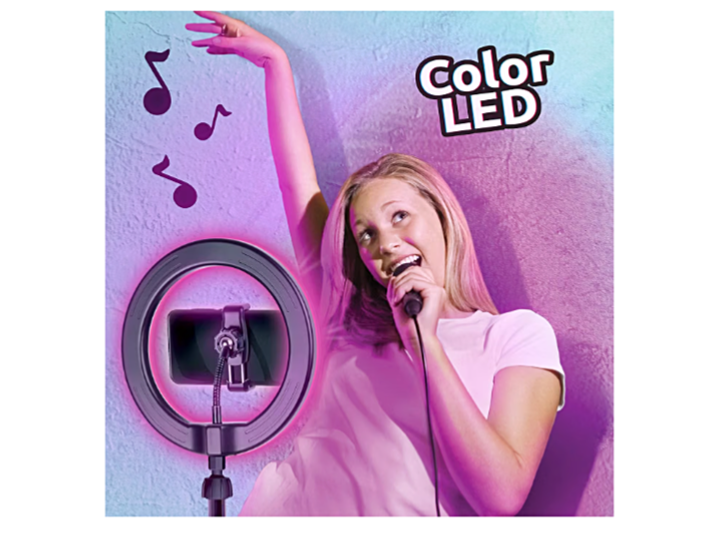
The Canal Toys Studio Creator 2 Influencer Video Creator Kit packs the basic pieces of a home video setup into one box: a ring light, an adjustable tripod, a smartphone holder and a green screen backdrop. At the time of writing the Amazon listing carries an Amazon's Choice badge and a 4.4 out of 5 average from 603 ratings. This review walks through what the kit includes, how it is meant to be used, what customers praise and where they report problems.
How this review was built
We have not tested this kit ourselves. This article summarizes the published product listing, the manufacturer's descriptions and the customer reviews visible on the page, and it says so where the evidence is thin. See our editorial policy for how we separate research from hands-on testing.
What the Studio Creator 2 kit includes
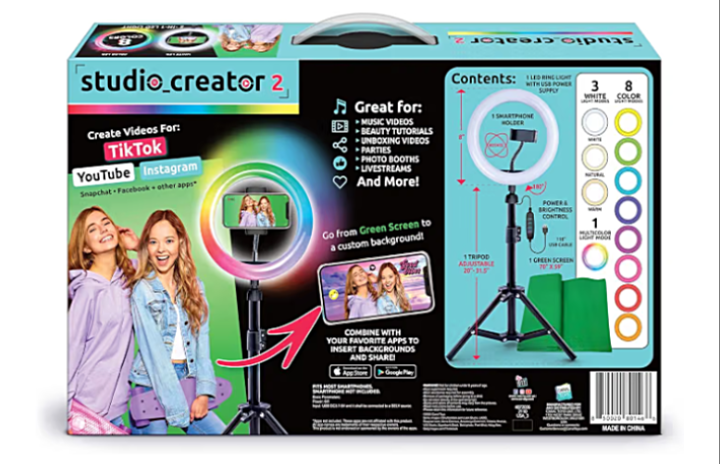
According to the listing, the box contains an 8-inch LED ring light with a USB power cord and an inline controller, an adjustable tripod, a flexible smartphone holder, a 70 x 59 inch green screen cloth and a guide. A smartphone is not included, and the listing says the holder fits most phones. The kit is labeled 8+ and carries a choking-hazard warning for children under 3 because of small parts.
| Component | Listed detail |
|---|---|
| Ring light | 8-inch LED ring with 12 light modes |
| Tripod | Adjustable, roughly 20 to 31.5 inches |
| Phone holder | Flexible neck, 360-degree rotation |
| Green screen | 70 x 59 inches, folds for storage |
| Power | USB cord with inline controller (about 118 inches) |
How the lighting works
The ring light offers three white modes (white, natural and warm), eight color modes and one multicolor mode. The inline controller on the cable switches between them. For everyday videos and selfies the white modes are the useful ones, because they keep skin tones looking natural. The color modes are better for music videos, gaming-style clips and anything where a colored glow is part of the look. Our upcoming guides to white light modes and ring light placement go deeper, and you can browse them all in the CreatorGear news section.
Check the Studio Creator 2 Kit on Amazon
See the current price, style options and customer reviews before you decide.
The green screen: the feature that sets this kit apart
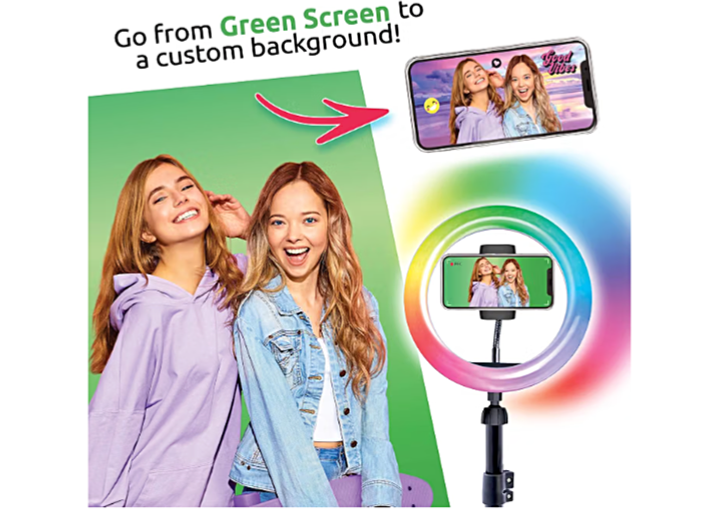
Most entry-level ring light stands stop at the light and tripod. This kit adds a green backdrop, which lets a creator record in front of it and then swap in a different background with a video editing app. The listing does not tie the kit to a particular app, and it states the kit is not affiliated with any apps, so you choose your own editor. Reviewers who mention the backdrop tend to like it; one even taped it to a wall and called it the most useful part of the package. A dedicated green screen walkthrough is coming soon in the news section.
What customers say
Amazon's generated summary of reviews says customers find the ring light good quality and nice for lighting, and many call the kit a great gift. Functionality gets mixed feedback in that summary, with a few reviewers saying it did not work for them. Individual reviews are mostly positive: parents describe daughters and sons who wanted to make their own videos, one reviewer says the instructions were easy to follow, and another says the light is bright and covers faces and upper torsos well.
The critical feedback is specific and worth reading. A three-star reviewer says the tripod extends only to roughly waist height, so a child has to record seated. The same reviewer reports that the phone clips sit outside the circle of the light, that the holder feels flimsy and that a phone tends to settle under its own weight. Those are practical limits to weigh against the low price, and they are worth weighing carefully.
Who the Studio Creator 2 suits
- Kids and beginners who want to try making videos without buying separate gear.
- Parents looking for a first creator gift; see our about page for how we pick what to cover.
- Anyone who wants a simple green screen experiment on a tight budget.
- People who record seated or on a table and do not need a tall stand.
Who should look elsewhere
If you plan to record standing, shoot with a heavy phone, use a camera instead of a phone or need studio-grade color accuracy, a toy-brand kit will feel limiting. The listing positions the product for creating content for social apps, with a family-friendly look, rather than for professional production. Serious creators usually outgrow a kit like this and move to separate lights, a sturdier stand and a dedicated backdrop, though it can still work as a backup or travel set.
Compare Styles and Prices on Amazon
The listing shows several styles, including Studio Creator 2, 360 Video Maker and a Podcast & Vlogging Kit.
Our research verdict
On paper, the Studio Creator 2 is a sensible starter kit: the parts match the job, the lighting modes are varied and the green screen is a real extra. The risks are the modest tripod height and a phone holder some reviewers find flimsy. For a young creator who records seated, or an adult who wants a cheap experiment with chroma key, the value case looks solid. For anyone who needs stability or standing height, read the complaints before you buy.
First-time setup tips before you record
- Unbox everything and check the parts against the guide so you know the kit is complete.
- Extend the tripod and tighten the fasteners before attaching the light or phone, because loose legs are the most common cause of wobble.
- Place the phone in the holder, rotate the ring so the camera lens sits in the middle of the circle and test with a short clip.
- Choose a white mode first. Switch to color modes only when you want a stylized look.
- Hang the green screen flat and keep the subject a few feet in front of it to avoid shadows on the cloth.
These steps are general good practice rather than instructions from the manufacturer, so follow the guide in the box where it differs. A short test recording, played back with headphones, will show you whether the light is too harsh, the framing is crooked or the audio is too quiet. Built-in phone microphones pick up room echo, so recording in a carpeted room with soft furnishings helps.
Frequently asked questions
Is a phone included with the Studio Creator 2?
No. The listing states that a smartphone is not included. The holder is described as fitting most smartphones.
What age is the kit for?
The listing says 8+, with a choking-hazard warning for children under 3 because the kit has small parts.
Does it come with a power adapter?
The listing shows a USB power cord with an inline controller. Check the listing and box contents to see whether a wall adapter is included, and be ready to use a phone charger block or power bank.
How tall does the tripod go?
The listing says it extends up to 31.5 inches, which one reviewer describes as roughly waist height.
Affiliate and research note
CreatorGear may earn a commission if you buy through links on this page, at no extra cost to you. Prices, availability and specifications can change, so confirm details on the retailer's page before purchasing.
Sources
- Amazon product listing: Canal Toys Studio Creator 2 Influencer Video Creator Kit
Product listing, manufacturer description, listing images and customer reviews reviewed at the time of writing.
Report a copyright issue with this article
Comments
No comments yet.