Build Your Studio. Create Without Limits.
- Explainer
What's in the Box: Studio Creator 2 Kit Contents, Sizes and Specs Explained
Know exactly what you get before you buy: the Studio Creator 2 kit contents, listed sizes and what you still need to supply yourself.
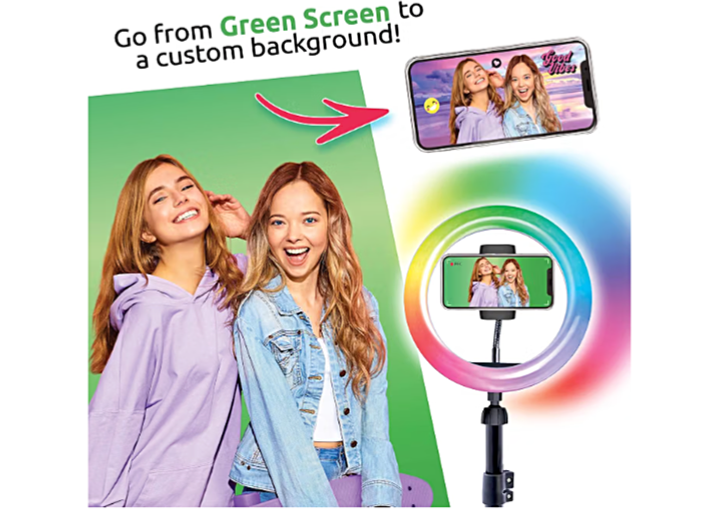
Before you buy any bundle, the most useful question is simple: what do I actually get, and what do I still need? This guide lists every component of the Studio Creator 2 video creator kit using the details on its Amazon listing, explains what each part does and points out the extras most buyers will want to add. If you want our overall opinion first, start with the full Studio Creator 2 review.
Where these details come from
We have not handled this kit. Sizes and features below come from the published listing and the manufacturer's description, and measurements are shown as listed, so check the product page for the latest figures.
The ring light
The light is an 8-inch LED ring. It offers 12 modes: three white (white, natural and warm), eight colors and one multicolor mode. It rotates 360 degrees, so you can tilt it to suit your face or the object you are filming. It is powered over USB, which means it needs a USB power source. The listing shows a cable of roughly 118 inches with a small inline controller for switching modes and, according to the diagram, adjusting brightness.
Eight inches is a compact size. It is enough to light a face at close range, such as a selfie or a tutorial filmed from a desk, but it will not flood a whole room. For a scene with several people or a wide shot you would want something larger; always match the light to the size of the scene.
The tripod
The tripod is adjustable between about 20 and 31.5 inches according to the listing diagram. It folds for storage and uses screw fasteners to lock the height. The listing describes ABS fastening screws and a metal screw at the head. That height range suits tabletop use or recording while seated. One reviewer notes that it reaches only about waist height, which matters if you plan to stand. Placing the tripod on a table or a sturdy box is the easiest workaround.
See What Is Included on the Listing
Check the full contents, photos and customer questions before ordering.
The smartphone holder
A flexible gooseneck holds the phone and can rotate 360 degrees, according to the listing. It stretches to grip most phones, though a smartphone itself is not included. Because the holder sits at the end of a bendy neck, heavy phones or thick cases may sag. If you use a large phone, test it before you record anything important.
The green screen
The backdrop measures 70 x 59 inches and is a fabric sheet that folds small. It is meant for chroma key editing: record in front of it, then replace the green with a picture or video in an editing app. It is not a rigid frame, so you hang or tape it. Hang it flat, with the fabric pulled tight and the folds steamed or smoothed out, because wrinkles cast shadows that make editing harder.
What you still need to supply
- A smartphone with a charged battery and enough free storage.
- A USB power source such as a phone charger block or power bank, since the listing shows a cable rather than a wall adapter.
- A video editing app if you want to replace the green background.
- Something to hang or tape the green screen, such as painter's tape or clips.
- A clear, quiet space with a plain wall or door.
Sizes at a glance
| Item | Listed size |
|---|---|
| Ring light | 8 inches across |
| Tripod height | About 20 to 31.5 inches |
| Green screen | 70 x 59 inches |
| USB cable | About 118 inches |
| Age grade | 8+ |
Because the cable is long, you can position the ring light a few feet from the power source, but keep the cable out of walkways so the tripod is not pulled over. You can check the current details on the Studio Creator 2 listing.
Ready to Look at the Kit?
Read the current reviews and see whether the style you want is available.
How the pieces fit together
The sequence matters. Open and lock the tripod first, because it carries all the weight. Attach the ring light to the head, then fit the flexible holder in the center of the ring. Plug the cable into the light and a USB power source last, so you are not stretching the cord while you adjust the height. Finally clip your phone into the holder and rotate the ring so the camera lens is centered. The listing diagrams show the holder inside the ring, and one reviewer reports that the clips can sit outside the circle on their unit, so look closely at how yours sits and adjust before you start.
Handling and safety notes
- The listing labels the kit 8+ and warns that small parts are a choking hazard for children under 3.
- The safety information on the listing says the light is for external use only, so keep it away from water.
- Run the USB cable along a wall or behind the tripod so no one trips over it.
- Switch the light off when you are not recording, and let adults handle setup for younger children.
- Do not stare directly into any bright LED at close range, and keep brightness at a comfortable level.
Compatibility questions to check
The listing says the holder fits most smartphones. If you use a very large phone, a thick rugged case or a folding phone, measure your device against the holder's stretch range before you assume it will work. Also confirm that your phone's camera position is not blocked by the ring or by the holder's clamps. If you plan to use a USB power bank, check that it can supply power at the same time as it charges other things, because some banks switch off when the drain is low.
For our overall verdict on how these parts perform together, read the Studio Creator 2 review. To understand how we handle affiliate links and research-based coverage, see our Affiliate Disclosure and Editorial Policy.
Frequently asked questions
Is the green screen included?
Yes, a 70 x 59 inch green screen is listed as part of the kit.
Does the kit include a camera?
No. You supply your own smartphone. The kit is designed around phone video.
Can I use the ring light without the tripod?
The light is designed to sit on the tripod. Use the listing images to see how the pieces connect before you plan other setups.
Is it safe for young children?
The listing grades it 8+ and warns about small parts for children under 3. Adults should supervise setup, especially around cables.
Affiliate and research note
Links on this page may be affiliate links. We may earn a commission at no cost to you. Check the retailer's page for current prices and specifications.
Sources
- Amazon product listing: Canal Toys Studio Creator 2 Influencer Video Creator Kit
Product listing, manufacturer description, listing images and customer reviews reviewed at the time of writing.
Report a copyright issue with this article
Comments
No comments yet.